
Network Installation
A reliable business network installation requires a strategic, layered hardware architecture and professional structured cabling.
Whether you are deploying a brand new Local Area Network (LAN) or upgrading an existing setup, designing the network infrastructure properly eliminates “dead zones,” protects corporate assets, and prevents productivity-killing downtime.
Step-by-Step Installation Action Plan
A successful physical deployment follows a structured pipeline:
Site Survey & Capacity Planning
- Map your floor plans to identify dense wall materials (concrete, brick, glass) that heavily degrade wireless signals.
- Calculate current and future bandwidth needs by tallying your total end-user devices, cloud applications, and security hardware.
Physical Layout & Structured Cabling
- Designate a central IT closet or server rack to hold your patch panels, switches, and uninterruptible power supplies (UPS).
- Run Cat6 Ethernet lines from the central rack to individual desk ports and target ceiling locations for the wireless access points.
Core Hardware Configuration
- Connect the modem to the enterprise router's Wide Area Network (WAN) port.
- Log into the admin management portal to configure subnets, assign the local DHCP range, and deploy Network Address Translation (NAT) rules.
Logical Network Segmentation
- Corporate LAN: Reserved exclusively for local corporate machines, servers, and sensitive internal databases.
- Guest Wi-Fi: Form an entirely separate Virtual LAN (VLAN) to allow customer web access while securely isolating them from company resources.
Verification & Testing
- Conduct localized speed tests, check packet loss metrics, and execute physical line audits to certify your cabling outputs
- Document the entire infrastructure layout in a unified, physical network diagram for future troubleshooting or expansion.
Network Architecture Comparison
| Feature | Wired LAN (Cat6/Cat6A) | Business Wi-Fi (WLAN) |
|---|---|---|
| Primary Use | High-demand endpoints (servers, VoIP, desktop PCs) | Highly mobile endpoints (laptops, tablets, smartphones) |
| Max Speeds | Up to 10 Gbps (highly stable) | Dynamic speeds varying by proximity/frequency |
| Security Risk | Exceptionally low (requires direct physical access) | Medium-high (requires strong WPA3 encryption) |
| Deployment Cost | High (requires physical cable drop runs) | Low-medium (scalable access point clusters) |
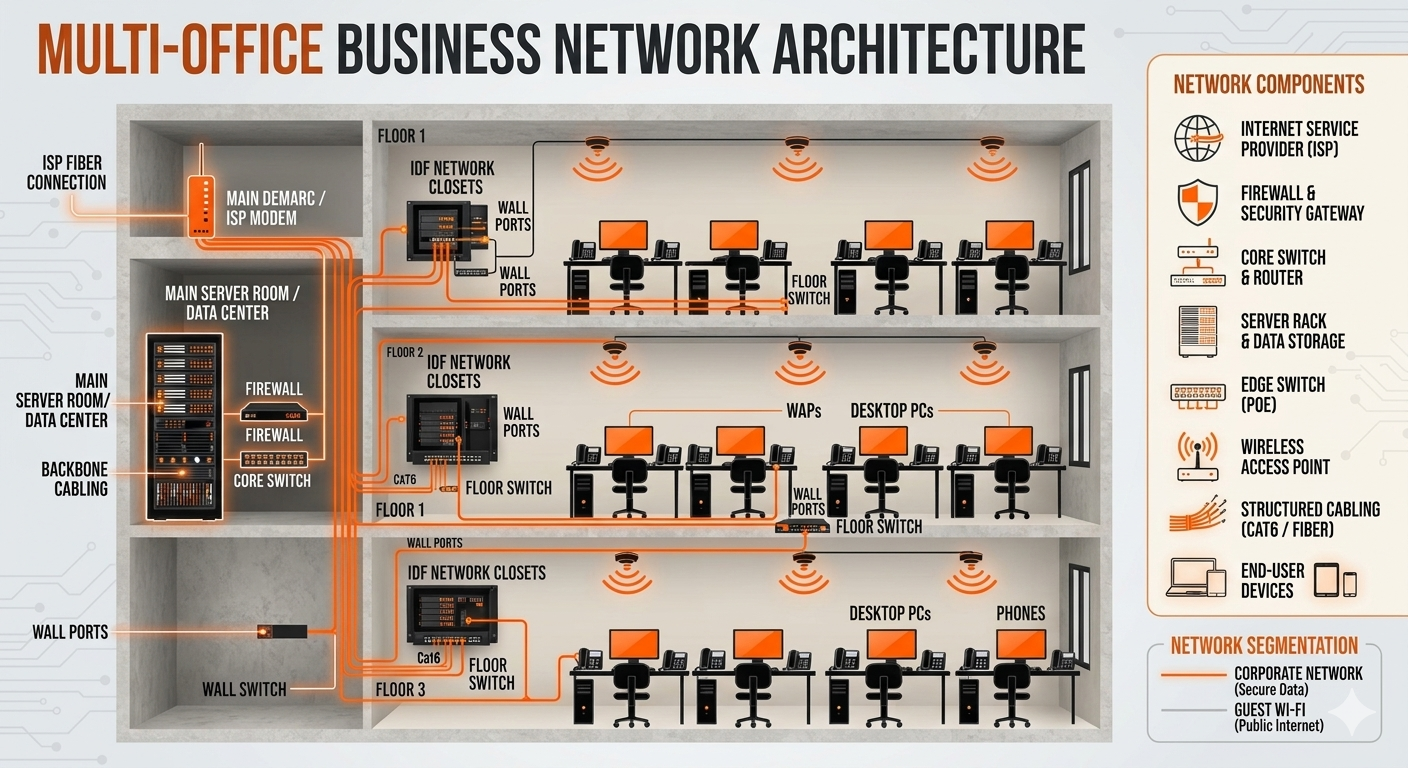
Key Infrastructure Components
- Modemt: The initial entry point connecting your local workspace to your Internet Service Provider (ISP).
- Firewall / Router:The "brain" of the operation. It directs data packet traffic, manages DHCP/IP routing, and blocks unauthorized security threats.
- Network Switches:: Local hardware aggregators. Businesses should invest in enterprise-grade Power over Ethernet (PoE) switches to supply electricity and data to devices via a single cable.
- Structured Cabling: High-quality physical lines (typically Cat6 or Cat6A copper) running through walls to provide stable, 10 Gbps physical hookups.
- Wireless Access Points (APs): : Multiple ceiling- or wall-mounted transmitters that project a unified Wi-Fi signal over large floor plans.